Tag: design

  • I’ve Waited 25 Years for Apple to Fix This.

    I’ve Waited 25 Years for Apple to Fix This.

    I’ve had a long-standing beef with macOS, going all the way back to the very first version of Mac OS X. It may be minor to some; to others, it may even be a non-issue. But for me, it’s pretty big.

    In a nutshell, here’s my issue:

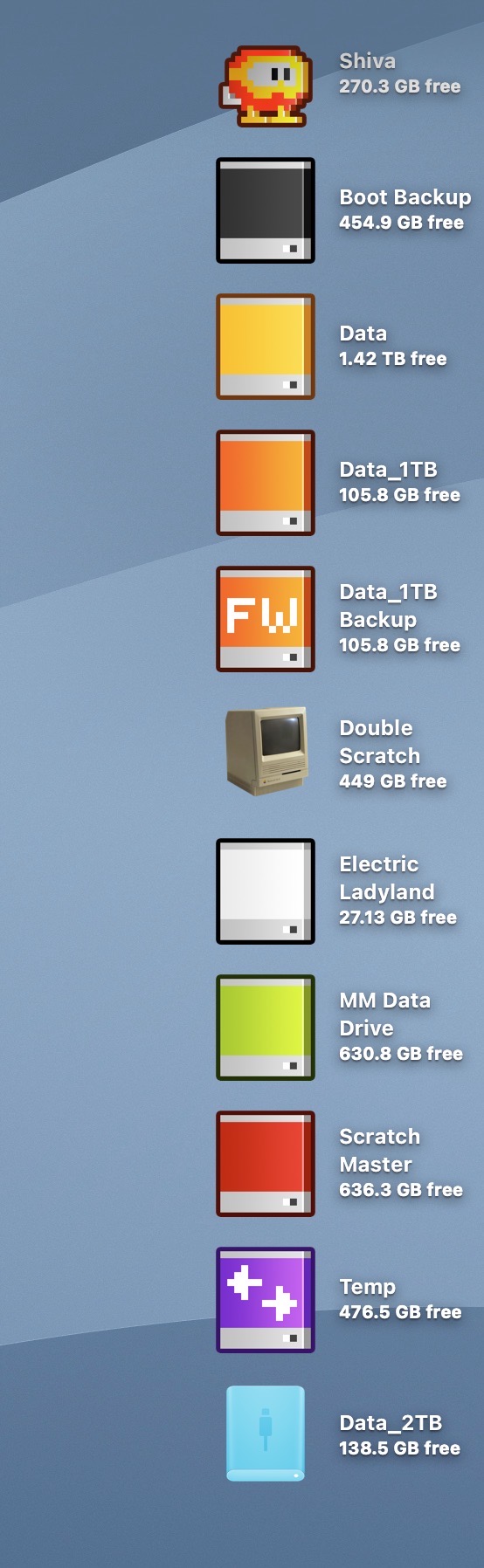
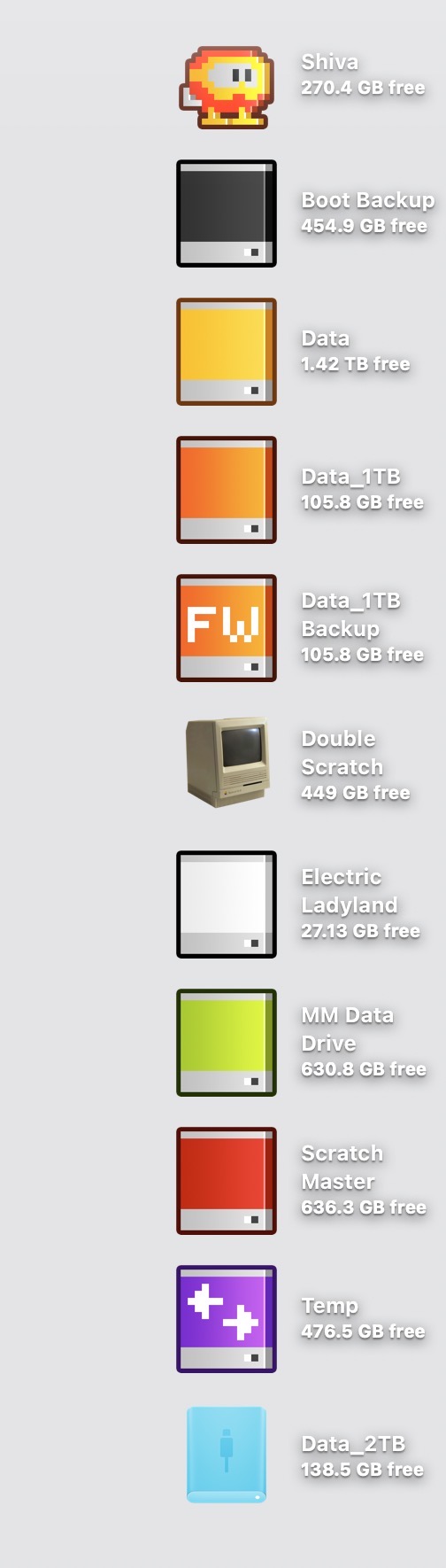
    The text that accompanies each icon on the Mac Desktop is very difficult to read when placed atop a light-hued background wallpaper. The text, rendered in white, is accompanied by a subtle drop shadow. On a medium or dark background wallpaper, this drop shadow creates the illusion of depth. But when this style is paired with a light-hued wallpaper, the text becomes much more difficult to read.

    Exhibit A: a mid-value wallpaper in macOS Tahoe:

    MacOS Tahoe mediumBG.

    Exhibit B: a light-value wallpaper in macOS Tahoe:

    MacOS Tahoe lightBG.

    It wasn’t always this way.

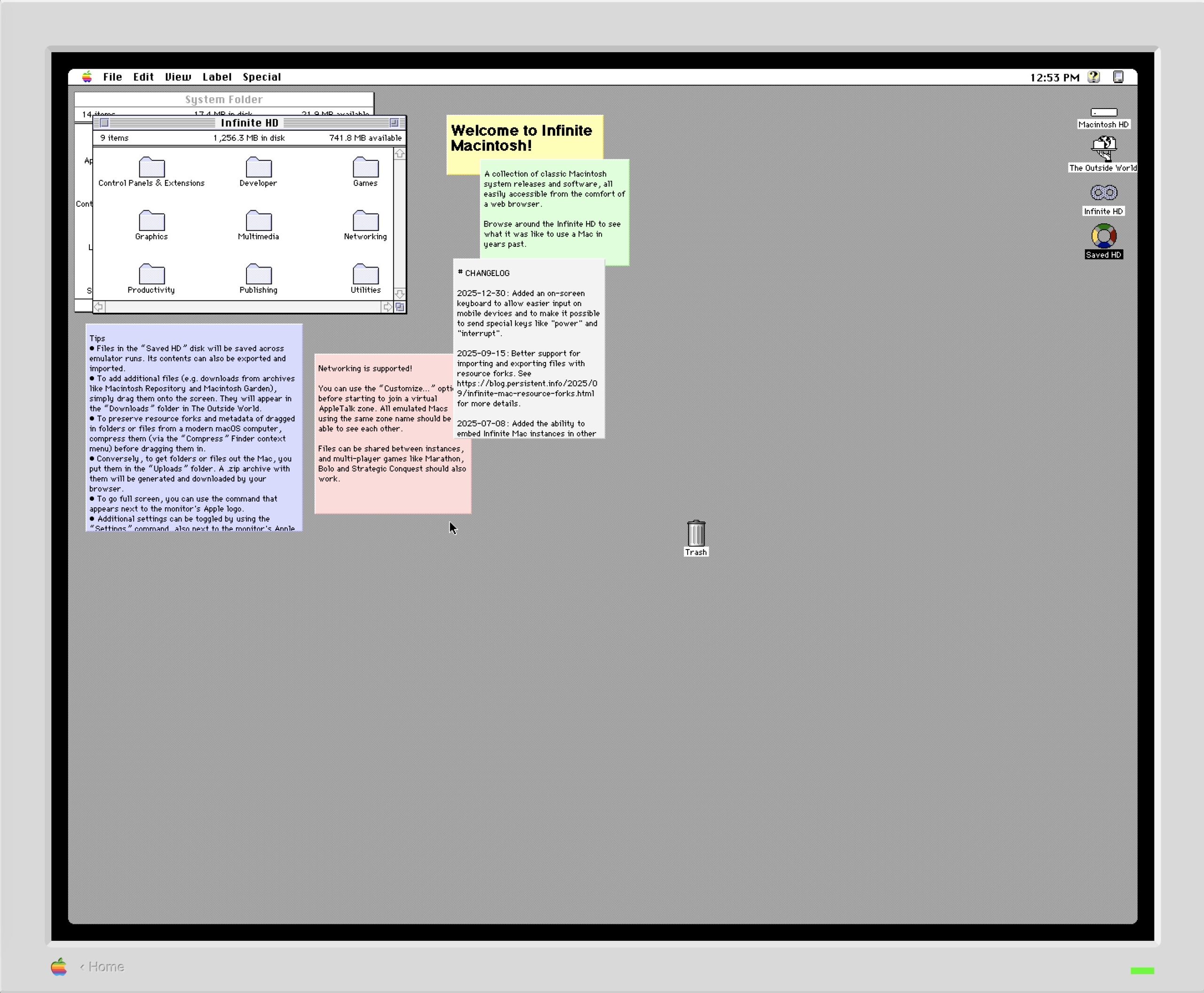
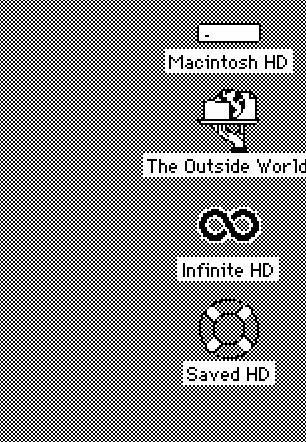
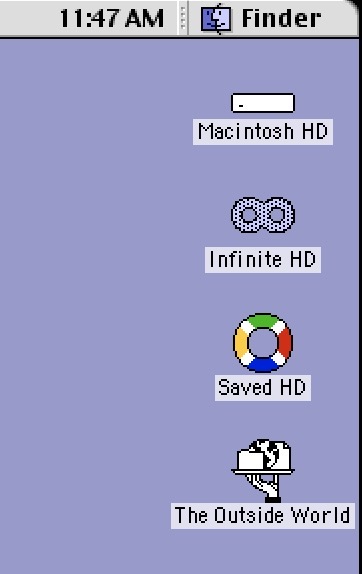
    In classic Mac OS, each icon had accompanying black text with a white background strip behind it. This approach ensured clear readability, independent of whatever wallpaper was chosen.

    Exhibit C: The Mac Desktop (macOS 7.5):

    Exhibit D: The Mac Desktop (macOS 9):

    Every version of macOS (including the forthcoming macOS Golden Gate) still provides no option to change the color of the text accompanying Desktop icons. It would be nice if Apple Intelligence could be employed to detect the value of the wallpaper background and automatically adjust the text color. In this setup, light backgrounds would automatically shift the icon text to black, and vice versa.

    I’ve filed a feedback form on this issue before macOS Tahoe shipped last year, but have yet to receive a response from Apple.

    -Krishna

  • Is Making Art Not Enough? Why?

    Is Making Art Not Enough? Why?

    Hat tip to Jason Kottke for bringing attention to this sobering and insightful essay by contemporary artist fnnch on How to Make a Living as an Artist

    The number one mistake I see artists make is not accepting that they run a business. If you cannot accept and even embrace this simple fact, you are totally hosed. It is hard to start a business; it is way harder to do it by accident.

    The author makes so many notable points on the realities that come with working as a full-time artist. As someone who freelances part-time, it’s not just about creating, it’s also about managing a business as an ongoing concern. As a creative freelancer, one must embrace marketing, promotion, and accounting

    There is so much wisdom in this essay, particularly on finding one’s style, and the image-market fit that keeps many artists from achieving success. 

    If you enjoy making art, ask yourself why that is not enough? Why do you need to make money from this activity? Why do you need to do it with more of your time? Can it not perhaps give you more joy remaining a hobby?

    I used to struggle between making work that I like and having to make work to please others. But with each passing year, I’m coming closer to the conclusion that maybe what I create for myself is all I need.

    -Krishna 

  • How I Learn New Design Skills in 2026

    How I Learn New Design Skills in 2026

    In terms of learning new skills, we live in a glorious time. The Internet is chock full of excellent, actionable design tutorials that go way beyond what a classroom environment or textbook could provide. 

    Incidentally, much of what I know about Photoshop comes from reading books and applying the techniques into my own work. (Aside: Scott Kelby’s “Photoshop Down and Dirty Tricks” and Matt Kloskowski’s “Layers” books are two excellent resources for hands-on learning.) This was in the days before YouTube, so options were limited.

    While I’m very comfortable with many aspects of Photoshop, I’m using this summer to really shore up my Adobe Illustrator skills. I have a good working foundation of vectors, anchor points and the like, but I want to go beyond OK and become highly proficient. 

    Enter social media. 

    I use my Instagram’s algorithm to surface tutorials on Illustrator. The more tutorials I like, the more Instagram learns what I’m interested in. The Instagram format provides me a space where I can be exposed to a wide gamut of Illustrator techniques. Some of the more helpful instructional reels show two contrasting approaches, amateur and pro. Seeing side-by-side comparisons in this way, allows me to build on what I know and improve my skill. My only critique is that some of these videos are a bit too fast; I have to watch a video multiple times in order to absorb the technique.

    When I watch a particularly useful video, especially one that includes accompanying keyboard shortcuts, I’ll take a screenshot of it on my iPhone and send it over to Apple Notes. I’ll then organize my screenshots into one Apple Notes file, for quick access. Because Apple Notes synchs across all my Apple devices, I have a collection of foundational tutorials that I can easily refer to when I’m at my Mac. 

    Viewing and capturing tutorials is only part of the learning equation. Practicing them on a new personal project helps reinforce what I have just learned. I also take the new skills I’ve learned and teach it on my YouTube channel. (The old adage rings especially true: “The more I teach, the more I learn.”)

    Make no mistake, Illustrator has a steep learning curve. Go into learning with an open mind. I recommend going to YouTube to learn the basics. From there, I recommend watching one or two Instagram tutorials a week, to get slowly exposed to new workflow techniques. Don’t overwhelm yourself.

    Practice what you’ve learned and find ways to inject that knowledge into a few of your own personal works, to build that muscle memory.  Scaffolding what you know with what you are learning gives room for absorption and a sense of accomplishment; two traits that are vital to learning.

    And lastly, don’t be afraid to experiment.

    -Krishna 

  • Reflections from Two Decades of Teaching

    Reflections from Two Decades of Teaching

    This month marks my 20th consecutive year of teaching design courses at the college level. I only started to reflect on my academic journey a few days ago, with the completion of our college’s Spring semester. 

    I fell into teaching backwards. It was never my goal. I started my career as an electrical engineer, working in the field of chip design. And even that was never my true ambition.

    From a young age, my biggest dream was to be an artist. My second love was computers. On paper, these two items seemed worlds apart. But over the years, technology and art have become very much intertwined. For me, digital media represents a perfect combination of technology and design; I get to play with computers and make art.

    Learning new things is fun, sharing what I’ve learned with others brings about true satisfaction. While I never took any formal courses in teaching, I had a good idea of how I wanted to position myself as an educator. 

    Here are a few tenets that have served me well:

    1) Be organized. Have a structure to each class. For each meeting, I have a clear, written agenda that I follow. Lesson plans are created in advance. Organization and competency go hand in hand.

    2) Be timely. Arrive and set up before class starts. I’m usually in the classroom at least 30 minutes before class starts. I check the classroom tech, have handouts at the ready and greet each student as they arrive. In my view, there’s nothing worse than entering a class full of waiting students. 

    3) Be impartial. This one’s tough, but I make it a point to let students know that I can’t bend the rules for them. Life happens, and I do have to make exceptions, but I insist on having the students provide me with written documentation should there be any mitigating issues that come up.

    4) Be available. I keep office hours on campus but I’m also available to my students via e-mail. Students often write with questions, and I make it a point to be timely with my responses. I also have set boundaries, when I don’t check my email. This gives me a healthy balance between work and home life.

    5) Be flexible. The best laid plans sometimes go out the window, whether it’s a classroom technology issue, a problem during a demo, or school closure during a hurricane event. I’ve learned the importance of how to pivot and adjust.

    6) Be authentic. I’m human. I make mistakes. Sometimes I’ll get tripped up during a demo. It’s OK. Nobody’s perfect. I think it’s important for students to know that their teachers can make mistakes. But what’s even more important is how the teacher can carefully think through the issue and get back on track. 

    These are just a few of the things I’ve learned in my 20 years of teaching. It’s been a struggle at times, but also been immensely satisfying. I’m glad I fell into teaching.

    -Krishna